Optimizing for Star Schemas on Amazon Redshift

This article explains how to optimize performance for an Amazon Redshift data warehouse that uses a star schema design. Many of these techniques will also work with other schema designs. We’ll talk about considerations for migrating data, when to use distribution styles and sort keys, various ways to optimize Amazon Redshift performance with star schemas, and how to identify and fix performance bottlenecks.

Amazon Redshift is a fully managed, petabyte-scale data warehouse service in the cloud. Amazon Redshift offers you fast query performance when analyzing virtually any size dataset using the same business intelligence applications you use today. Amazon Redshift uses many techniques to achieve fast query performance at scale, including multi-node parallel operations, hardware optimization, network optimization, and data compression. At the same time, Amazon Redshift minimizes operational overhead by freeing you from the hassle associated with provisioning, patching, backing up, restoring, monitoring, securing, and scaling a data warehouse cluster. For a detailed architecture overview of the Amazon Redshift service and optimization techniques, see the Amazon Redshift system overview.

To get in depth knowledge on AWS you can enroll for free live demo AWS Online Course

Many business intelligence solutions use a star schema or a normalized variation called a snowflake schema. Such solutions typically have tooling that depends upon a star schema design. Star schemas are organized around a central fact table that contains measurements for a specific event, such as a sold item. The fact table has foreign key relationships to one or more dimension tables that contain descriptive attribute information for the sold item, such as customer or product. Snowflake schemas extend the concept by further normalizing the dimensions into multiple tables. For example, a product dimension may have the brand in a separate table. For more information, see star schema and snowflake schema.
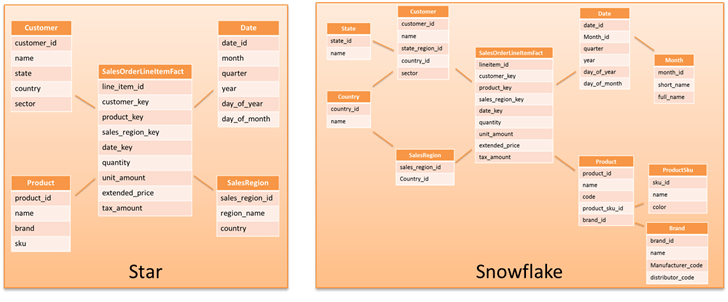
Example star and
snowflake schemas

The Amazon Redshift design accommodates all types of data models, including 3NF, denormalized tables, and star and snowflake schemas. You should start from the assumption that your existing data model design will just work on Amazon Redshift. Most customers experience significantly better performance when migrating their existing data models to Amazon Redshift largely unchanged, though you should test for performance using either the actual or a representative dataset to ensure that your data model design and query patterns perform well before putting the workload into production.

Optimizations for Star Schemas

Amazon Redshift automatically detects star schema data structures and has built-in optimizations for efficiently querying this data. You also have a number of optimization options under your control that affect query performance whether you are using a star schema or another data model. The following sections explain how to apply these optimizations in the context of a star schema.

Primary and Foreign Key Constraints

When you move your data model to Amazon Redshift, you can declare your primary and foreign key relationships. Even though Amazon Redshift does not currently enforce these relationships, the query optimizer uses them as a hint when it analyzes a query. In certain circumstances, Amazon Redshift uses this information to optimize the query by eliminating redundant joins. Generally, the query optimizer detects redundant joins without constraints defined if you keep statistics up to date by running the ANALYZE command as described later in this article.

Learn for more AWS Interview Questions

To avoid unexpected query results, you should ensure that the data being loaded does not violate foreign key constraints and that primary key uniqueness is maintained by enforcing no duplicate inserts. For example, if you load the same file twice with the copy command, Amazon Redshift does not enforce primary keys and will duplicate the rows in the table. This duplication violates the primary key constraint. For more information, see Defining constraints in the Amazon Redshift Database Developer Guide.

Distribution Styles

The following distribution style guidelines are not hard-and-fast rules but rather a good place to begin with optimizations. You should test and experiment to find the right balance between considerations such as query frequency, complexity, and criticality when deciding which distribution style and which distribution keys to use. If you find that you have some complex, long-running queries that may back up simpler, frequently used queries, then consider using the Amazon Redshift workload management feature to partition the queries into different queues. For more information, see Workload management.

Using a distribution key is a good way to optimize the performance of Amazon Redshift when you use a star schema. If a distribution key is not defined for a table, data is spread equally across all nodes in the cluster to ensure balanced performance across nodes; however, in many cases, simply distributing data equally does not optimize performance for each node or slice in the cluster.

A good distribution key distributes data relatively evenly across nodes while also collocating joined data to improve cluster performance. If you are using a star schema, follow these distribution key guidelines to optimize Amazon Redshift performance across nodes:

  • Define a distribution key for your fact table as the foreign key to one of the larger dimension tables.
  • Identify frequently joined dimension tables with slowly changing data that are not joined with the fact table on a common distribution key. These are good candidates for the distribution style of ALL.
  • Choose the primary (or surrogate) key as the distribution key for remaining dimension tables.

A compute node is divided into slices. The number of slices is equal to the number of processor cores on the node. A slice is the unit at which data is distributed within the cluster. For more information about the elements of the Amazon Redshift data warehouse architecture, see Data warehouse system architecture in the Amazon Redshift Database Developer Guide.

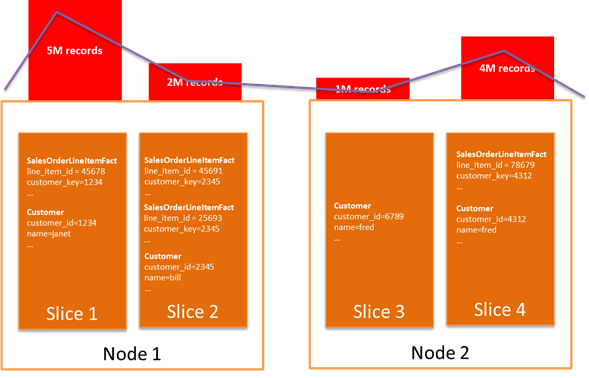
If you have multiple tables with distribution keys, then the row data with the same distribution key value resides on the same slice, regardless of which table the data comes from. This occurs because Amazon Redshift hashes the distribution key value to determine the slice for the data in each table. Thus the same key value results in the same hash regardless of the table. In the preceding example, the Sales Order LineItemFact table has a distribution key of customer_key, and the Customer dimension table has a distribution key of customer_id. The data where customer_key equals customer_id will be located on the same slice in a node.

As illustrated in the following diagram, when Customer and Sales Order LineItem Fact are joined on customer_id and customer_key, then the joined row data are located on the same slice, eliminating any inter-node data movement to satisfy the join.
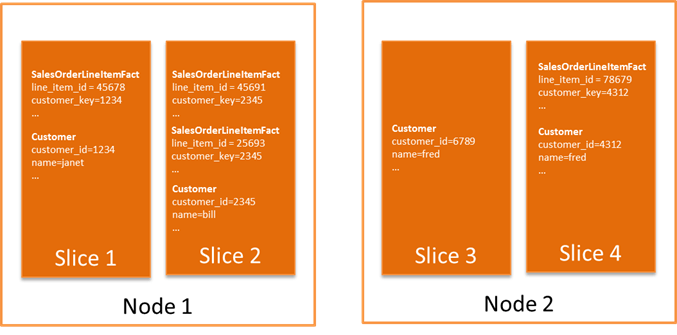
When you choose distribution keys, you should optimize for your most common joins while striving to spread data relatively evenly across the cluster for your tables. In the preceding example, if you were doing an operation on sales order, then Slice 2 needs to process two sales order lines while Slice 3, representing a customer with no orders, will do no work.

Figure 3 further illustrates how choosing a poor distribution key that excessively skews (unevenly distributes) data can degrade performance. In this scenario, when several large customers purchase a large proportion of the products from your company, distributing the fact table by customer_key results in a skew. The blue line represents compute utilization on each node.
In many cases, you may need to experiment with your data to see if the resulting distribution is reasonable. Sometimes a distribution key based upon the size of the joined tables seems like a good choice, but it ends up being a poor choice when you take skew into account. A common case is when two larger tables are joined on a particular column but the value in one of the tables is often null. For example, say you choose user_id for a distribution key in a table of web log file entries and a table of user profiles that are often joined, where the user_id in the log table is null if the user is not logged in. On the surface, user_id seems like a good choice, because both tables are large. However, the log table ends up with a large number of rows concentrated on the null column value, resulting in severe skew on one slice. For examples that show how to determine if your data is evenly distributed, see Distribution examples.

Amazon Redshift also has a distribution style of ALL. This distribution style replicates the table data once per node. Because the copy is used by all slices on the node, this distribution style has an impact on available storage. This distribution style is suitable for dimension tables that fit the following criteria:

  • Reasonably large in size – You should experiment and measure the impact of this distribution style. Redshift moves data between nodes efficiently, so very small tables will not see significant gains.
  • Slowly changing dimension data – Loading data into tables with a distribution style of ALL is expensive, but it can be worth it if the data is updated infrequently. Frequently changing dimension data with a distribution style of ALL increases load times significantly.
  • Frequently joined on a column that is not a common distribution key – Typically this occurs because there is a larger dimension table joined with the fact table that uses a different distribution key or because the join key causes uneven data distribution when chosen as the distribution key.

Typically a star schema has a large fact table and numerous, comparatively smaller dimension tables. You can follow these steps to optimize the distribution choices for optimized table joins:

  1. Identify large dimension tables used in joins.
  2. Choose the large dimension that is most frequently joined as indicated by your query patterns.
  3. Follow the guidelines in the preceding section to make sure that the foreign key to the dimension in the fact table gives relatively even distribution across your facts and that the primary/surrogate key for the dimension table is also relatively evenly distributed. If distribution is not relatively even, choose a different dimension.
  4. Use the foreign key to the identified dimension as your fact table distribution key, and use the primary key in the dimension table as your dimension table distribution key.
  5. Identify dimension tables that are suitable for a distribution style of ALL as described earlier in this article.
  6. For the remainder of your dimension tables, define the primary key as the distribution key. The primary key does not typically exhibit significant data skew. If it does, then don’t define a distribution key.
  7. Test your common queries and use the EXPLAIN command for any queries that need further tuning. For information about the EXPLAIN command, see the EXPLAIN command documentation.

Amazon Redshift is intelligent about minimizing the internode transmission of data to satisfy a query when it does joins, both by ordering how it executes elements of the join and by using techniques like hashing to minimize internode data transfer. Examples and techniques for performing joins are explained in EXPLAIN operators, Join examples, and the EXPLAIN command documentation. For more information about choosing a distribution key, see Choosing a data distribution style in the Amazon Redshift Database Developer Guide.

Sort Keys

You can improve query performance on Amazon Redshift by defining a sort key for each of your tables. A sort key determines how data is stored on disk for your table. The primary way a sort key improves query performance is by optimizing I/O operations when columns defined in the sort key are used in the where clause as a filtering condition (often called a filter predicate) or in operations like group by or order by. You should identify the most frequently used column for filtering and ordering operations in your dimension and fact tables as the sort key for each table.

If more than one column is typically used as a filter predicate, you can improve filtering efficiency by specifying multiple columns as part of the sort key. For example, let’s say the color and size columns are both specified in the sort key. If you filter on color = ‘red’ and size = ‘xl’, the use of color and size in the filtering and sort key makes the query execution more efficient. If you filter on color = ‘red’, the sort key will still be used to make the query more efficient since color is part of the leading key (the combination of the leading sort key columns). On the other hand, if you filter only for size=’xl’, then the sort key will not be used in the query execution because size is not part of the leading key. If the leading key is relatively unique (often called high cardinality), adding additional columns to your sort key will have little impact on query performance but will have a potential maintenance cost.

The sort key can have limited positive impact in other areas such as influencing more efficient joins and aggregations; however, the impact is not as reliable as the distribution key. For more information about defining sort keys, see Choosing sort keys in the Amazon Redshift Database Developer Guide.

Data Compression

Amazon Redshift optimizes the amount and speed of data I/O by using compression and purpose-built hardware. By default, Amazon Redshift analyzes the first 100,000 rows of data to determine the compression settings for each column when you copy data into an empty table. You can usually rely upon the Amazon Redshift logic to automatically choose the optimal compression type for you, but you can also choose to override these settings. Leaving compression turned on helps your queries to perform faster and minimizes the amount of physical storage your data consumes, thus allowing you to store larger datasets in your cluster. We strongly recommend that you use automatic compression. For more information about controlling compression options, see Choosing a column compression type.

Amazon fits EFS with better access management

Amazon has updated its elastic file system (EFS) with new access management and security features in a bid to make creating “scalable architectures sharing data and configurations” easier.

Image result for Amazon fits EFS with better access management
Amazon EFS Management

Customers can now setup file system policies when creating or updating EFS systems. They are realised via identity and access management (IAM) resource policies and are applied to all NFS clients connecting to a file system.

During the setup process, users can choose whether root access should be disabled by default, if read-only access should be enforced as a standard, and if in-transit encryption needs to be a must for all clients. Policies are created in JSON format and can be altered to fit more complex scenarios and for example give certain accounts or IAM roles more privileges.

If you are interested to learn AWS you can enroll for free live demo AWS Online Training

Every time an IAM permission is checked, the AWS CloudTrail console logs an appropriate event, making the process auditable.

The second new feature, access points, pursue a similar purpose, offering admins more control when allowing applications file system access. Access points let them specify which POSIX user and group to use for a connection, which can be used to restrict access to selected directories only.

The new addition is especially highlighted as a way of securing container-based environments, and data science projects that shouldn’t be allowed to write to production data. The latter can be implemented in combination with IAM authentication for example, thus rounding up the update.

Learn for more Latest AWS interview questions

EFS is available in all AWS regions except Osaka, which has a special local region status, and Beijing and Ningxia, which are operated by local providers. Additional information can be found in Amazon EFS’ documentation.

Which AWS Lambda programming language should you use?

This article will be a two-parter. I’m going to explore the pros and cons of the most popular programming languages with Lambda and the second one will contain benchmarks of said languages on Lambda. Hopefully, this will end up shedding some light on this particular subject.

Image result for AWS Lambda programming language should you use?
AWS Lambda

So without further ado, here we go, with great biased and no benchmark to back my claims off(but do check back the blog soon and we’ll have those benchmarks ready for you).

If you are interested to learn AWS You can enroll for free live demo AWS Online Course

Java
Java has been in service for decades and is, to this day, a reliable option when choosing the backbone of your stack. With AWS Lambda is no different as it makes a strong candidate for your functions.

Java applications in AWS Lambda have the following merits.
Reliable and well-tested libraries. The libraries will make life easy for you through enhanced testability(test-ability?) and maintainability of AWS lambda tasks.

Predictive performance. While Java has slower spin up time, you can easily predict the memory needs of your functions and to counteract those dreaded colds starts you can just up your memory allocation.

Tooling Support. Java has a wide range of tooling support which includes Eclipse, IntelliJ IDEA, Maven, and Gradle among others.

If you’re wondering how Java remains an efficient AWS lambda language, here is the answer. Java has unique characteristics like multi-thread concurrency, platform independence, secure, and object-oriented.

Node.js
I’m definitely biased but Node.js is probably the best one in this list. I know it has it’s minuses but the overwhelming support that node had in the past years has to have its merits.

Why Node.js?
Modules. As of now, there are 1735 plugins on npm tagged “aws-lambda” which help developers with their applications in a lot of different ways from running Lambda locally to keeping vital functions warm to avoid clod-starts.

Spinup times. Node.js has better spin-up times than C# or Java which make it a better option for client facing applications that risk suffering from uneven traffic distribution.

Community. I’d be remiss if I wasn’t mentioning this as one of the major draw-ins of node is its community support on which you can always rely to find a solution to your problem.

Python
Python applications are everywhere. From GUI based desktops, web frameworks, operating systems, and enterprise applications. In the past few years, we’ve seen a lot of developers adopting python and it seems like this trend is not stopping.

Take your career to new heights of success with an Python Online course

The benefits of Python in AWS Lambda environments.
Unbelievable spin up times. Python is without a doubt the absolute winner when it comes to spinning up containers. It’s about 100 times faster than Java or C#.

Third party modules. Like npm, python has a wide variety of modules available. The feature helps ease interaction with other languages and platforms.

Easy to learn and community support If you are a beginner, programming languages can scare you. However, Python has extensive readability and a supportive community to help in its application. The Pythonistas have uploaded more than 145,000 support packages to help users.

Simplicity. With python you can void the overcomplicated arhitecture

Go
Introduction of GO language was a significant move forward for AWS Lambda. Although Go has its share of problems, it’s suitable for a serverless environment and the merits of Go are not to be ignored.

So, what is so outstanding about Go?
Go has a remarkable tenacity of 1.x. Unlike other languages like Java, C++, and others, Go has the highest tenacity. Such tenacity rate is a promise of a correct compilation of programs without constant alterations.

Go uses statistic binaries. It implies that the need for statistic linking is no more. Besides programming, AWS Lambda programs with Go would help enjoy forward compatibility.

Go offers stability It’s unique tooling, language design, and ecosystem makes the programming language shine.

Goroutines. Goroutines are a way of writing code which can run concurrently, whilst letting Go handle how many threads should actually be running at once which work amazingly in AWS Lambda.

Net.Core Language

Net.Core language popularity in programming stands out and it’s a welcomed addition to people already relying on AWS for running their .net applications.

NuGet Support. Just like all the other languages supported on Lambda, Net.core gets module support via NuGet which makes life for developers a lot easier.

Consistent performance. Net.Core has a more consistent performance result than Node.js or Python as a result of it’s less dynamic nature.

Faster execution Compared to Go, Net.Core has a faster execution time which is not something to be ignored.

  1. Ruby
    If you’re an AWS customer, then Ruby is familiar to you. Ruby programming language stands out as it reduces complexities for AWS lambda users.

So, what are the benefits of Ruby in AWS lambda?
Third party module support. The language has unique modules that allow the addition of new elements of class hierarchy at runtime. Strong and supportive community. It thus makes it simple to use.

Clean Code. It’s clean code improves AWS Lambda performance.

Ruby is a relatively new addition to the AWS Lambda roaster but there is a lot of interest around it already. I look forward to seeing how far we can push Ruby using AWS Lambda.

Conclusion:

At first glance performance in a controlled, similar environment, running the same kind of functions isn’t all that different and until you get these to production you won’t be able to get a definitive conclusion. Stay tuned for the follow up for this article which will contain an updated benchmark of all the Languages supported by AWS Lambda in 2019.

What Is Amazon CloudFront?

Amazon CloudFront is a web service that speeds up distribution of your static and dynamic web content, such as .html, .css, .js, and image files, to your users. CloudFront delivers your content through a worldwide network of data centers called edge locations. When a user requests content that you’re serving with CloudFront, the user is routed to the edge location that provides the lowest latency (time delay), so that content is delivered with the best possible performance.

To get in depth knowledge on AWS you can enroll for free live demo AWS Online Course

If the content is already in the edge location with the lowest latency, CloudFront delivers it immediately.

If the content is not in that edge location, CloudFront retrieves it from an origin that you’ve defined—such as an Amazon S3 bucket, a MediaPackage channel, or an HTTP server (for example, a web server) that you have identified as the source for the definitive version of your content.

As an example, suppose that you’re serving an image from a traditional web server, not from CloudFront. For example, you might serve an image, sunsetphoto.png, using the URL http://example.com/sunsetphoto.png.

Your users can easily navigate to this URL and see the image. But they probably don’t know that their request was routed from one network to another—through the complex collection of interconnected networks that comprise the internet—until the image was found.

CloudFront speeds up the distribution of your content by routing each user request through the AWS backbone network to the edge location that can best serve your content. Typically, this is a CloudFront edge server that provides the fastest delivery to the viewer. Using the AWS network dramatically reduces the number of networks that your users’ requests must pass through, which improves performance. Users get lower latency—the time it takes to load the first byte of the file—and higher data transfer rates.

You also get increased reliability and availability because copies of your files (also known as objects) are now held (or cached) in multiple edge locations around the world.

How You Set Up Cloud Front to Deliver Content

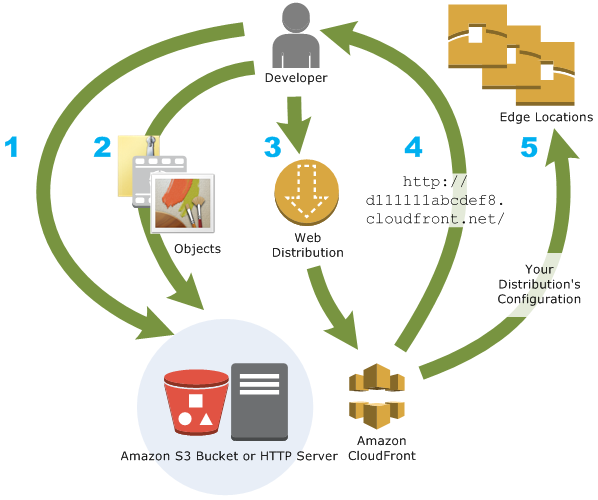
You create a CloudFront distribution to tell CloudFront where you want content to be delivered from, and the details about how to track and manage content delivery. Then CloudFront uses computers—edge servers—that are close to your viewers to deliver that content quickly when someone wants to see it or use it.

 
				How CloudFront works
amazon cloud front

How You Configure CloudFront to Deliver Your Content

  1. You specify origin servers, like an Amazon S3 bucket or your own HTTP server, from which CloudFront gets your files which will then be distributed from CloudFront edge locations all over the world.An origin server stores the original, definitive version of your objects. If you’re serving content over HTTP, your origin server is either an Amazon S3 bucket or an HTTP server, such as a web server. Your HTTP server can run on an Amazon Elastic Compute Cloud (Amazon EC2) instance or on a server that you manage; these servers are also known as custom origins.If you use the Adobe Media Server RTMP protocol to distribute media files on demand, your origin server is always an Amazon S3 bucket.
  2. You upload your files to your origin servers. Your files, also known as objects, typically include web pages, images, and media files, but can be anything that can be served over HTTP or a supported version of Adobe RTMP, the protocol used by Adobe Flash Media Server.If you’re using an Amazon S3 bucket as an origin server, you can make the objects in your bucket publicly readable, so that anyone who knows the CloudFront URLs for your objects can access them. You also have the option of keeping objects private and controlling who accesses them.
  3. You create a CloudFront distribution, which tells CloudFront which origin servers to get your files from when users request the files through your web site or application. At the same time, you specify details such as whether you want CloudFront to log all requests and whether you want the distribution to be enabled as soon as it’s created.
  4. CloudFront assigns a domain name to your new distribution that you can see in the CloudFront console, or that is returned in the response to a programmatic request, for example, an API request. If you like, you can add an alternate domain name to use instead.
  5. CloudFront sends your distribution’s configuration (but not your content) to all of its edge locations or points of presence (POPs)— collections of servers in geographically-dispersed data centers where CloudFront caches copies of your files.

Or you can set up CloudFront to use your own domain name with your distribution. In that case, the URL might be http://www.example.com/logo.jpg.

Optionally, you can configure your origin server to add headers to the files, to indicate how long you want the files to stay in the cache in CloudFront edge locations. By default, each file stays in an edge location for 24 hours before it expires. The minimum expiration time is 0 seconds; there isn’t a maximum expiration time limit.

What is Amazon Web Services Console Mobile App

The AWS Console mobile app, provided by Amazon Web Services, allows its users to view resources for select services and also supports a limited set of management functions for select resource types.

Related image
aws mobile app

Following are the various services and supported functions that can be accessed using the mobile app.

to get in depth knowledge on AWS you can enroll for free live demo AWS Online Training

EC2 (Elastic Compute Cloud)

  • Browse, filter and search instances.
  • View configuration details.
  • Check status of CloudWatch metrics and alarms.
  • Perform operations over instances like start, stop, reboot, termination.
  • Manage security group rules.
  • Manage Elastic IP Addresses.
  • View block devices.

Elastic Load Balancing

  • Browse, filter and search load balancers.
  • View configuration details of attached instances.
  • Add and remove instances from load balancers.

S3

  • Browse buckets and view their properties.
  • View properties of objects.

Route 53

  • Browse and view hosted zones.
  • Browse and view details of record sets.

RDS (Relational Database Service)

  • Browse, filter, search and reboot instances.
  • View configuration details, security and network settings.

Auto Scaling

  • View group details, policies, metrics and alarms.
  • Manage the number of instances as per the situation.

Elastic Beanstalk

  • View applications and events.
  • View environment configuration and swap environment CNAMEs.
  • Restart app servers.

DynamoDB

  • View tables and their details like metrics, index, alarms, etc.

CloudFormation

  • View stack status, tags, parameters, output, events, and resources.

OpsWorks

  • View configuration details of stack, layers, instances and applications.
  • View instances, its logs, and reboot them.

CloudWatch

  • View CloudWatch graphs of resources.
  • List CloudWatch alarms by status and time.
  • Action configurations for alarms.

Services Dashboard

  • Provides information of available services and their status.
  • All information related to the billing of the user.
  • Switch the users to see the resources in multiple accounts.

Features of AWS Mobile App

To have access to the AWS Mobile App, we must have an existing AWS account. Simply create an identity using the account credentials and select the region in the menu. This app allows us to stay signed in to multiple identities at the same time.

For security reasons, it is recommended to secure the device with a passcode and to use an IAM user’s credentials to log in to the app. In case the device is lost, then the IAM user can be deactivated to prevent unauthorized access.

Root accounts cannot be deactivated via mobile console. While using AWS Multi-Factor Authentication (MFA), it is recommended to use either a hardware MFA device or a virtual MFA on a separate mobile device for account security reasons.

Overview of amazon Amazon Deep Learning AMIs

Amazon Deep Learning AMIs

The AWS Deep Learning AMIs provide machine learning practitioners and researchers with the infrastructure and tools to accelerate deep learning in the cloud, at any scale. You can quickly launch Amazon EC2 instances preinstalled with popular deep learning frameworks such as Apache MXNet and Gluon, TensorFlow, Microsoft Cognitive Toolkit, Caffe, Caffe2, Theano, Torch, PyTorch, Chainer, and Keras to train sophisticated, custom AI models, experiment with new algorithms, or to learn new skills and techniques

Image result for Overview of amazon Amazon Deep Learning AMIs

AWS DeepLens
AWS DeepLens helps put deep learning in the hands of developers, literally, with a fully programmable video camera, tutorials, code, and pre-trained models designed to expand deep learning skills.

If you are interested to learn AWS you can enroll for free live demo AWS Online certification

AWS DeepRacer
AWS DeepRacer is a 1/18th scale race car which gives you an interesting and fun way to get started with reinforcement learning (RL). RL is an advanced machine learning (ML) technique which takes a very different approach to training models than other machine learning methods. Its super power is that it learns very complex behaviors without requiring any labeled training data, and can make short term decisions while optimizing for a longer term goal. With AWS DeepRacer, you now have a way to get hands-on with RL, experiment, and learn through autonomous driving. You can get started with the virtual car and tracks in the cloud-based 3D racing simulator, and for a real-world experience, you can deploy your trained models onto AWS Deep Racer and race your friends, or take part in the global AWS Deep Racer League.Developers, the race is on.

Apache MXNet on AWS

Apache MXNet on AWS is a fast and scalable training and inference framework with an easy-to-use, concise API for machine learning. MXNet includes the Gluon interface that allows developers of all skill levels to get started with deep learning on the cloud, on edge devices, and on mobile apps. In just a few lines of Gluon code, you can build linear regression, convolutional networks and recurrent LSTMs for object detection, speech recognition, recommendation, and personalization.

You can get started with MxNet on AWS with a fully-managed experience using Amazon SageMaker, a platform to build, train, and deploy machine learning models at scale. Or, you can use the AWS Deep Learning AMIs to build custom environments and workflows with MxNet as well as other frameworks including TensorFlow, PyTorch, Chainer, Keras, Caffe, Caffe2, and Microsoft Cognitive Toolkit.

TensorFlow on AWS

TensorFlow™ enables developers to quickly and easily get started with deep learning in the cloud. The framework has broad support in the industry and has become a popular choice for deep learning research and application development, particularly in areas such as computer vision, natural language understanding and speech translation.

You can get started on AWS with a fully-managed TensorFlow experience with Amazon SageMaker, a platform to build, train, and deploy machine learning models at scale. Or, you can use the AWS Deep Learning AMIs to build custom environments and workflows with TensorFlow and other popular frameworks including Apache MXNet, PyTorch, Caffe, Caffe2, Chainer, Gluon, Keras, and Microsoft Cognitive Toolkit.

Take your career to new heights of success with an Machine Learning Online Course

AWS Inferentia
AWS Inferentia is a machine learning inference chip designed to deliver high performance at low cost. AWS Inferentia will support the TensorFlow, Apache MXNet, and PyTorch deep learning frameworks, as well as models that use the ONNX format.

Making predictions using a trained machine learning model–a process called inference–can drive as much as 90% of the compute costs of the application. Using Amazon Elastic Inference, developers can reduce inference costs by up to 75% by attaching GPU-powered inference acceleration to Amazon EC2 and Amazon SageMaker instances. However, some inference workloads require an entire GPU or have extremely low latency requirements. Solving this challenge at low cost requires a dedicated inference chip.

AWS Inferentia provides high throughput, low latency inference performance at an extremely low cost. Each chip provides hundreds of TOPS (tera operations per second) of inference throughput to allow complex models to make fast predictions. For even more performance, multiple AWS Inferentia chips can be used together to drive thousands of TOPS of throughput. AWS Inferentia will be available for use with Amazon SageMaker, Amazon EC2, and Amazon Elastic Inference.

Networking and Content Delivery Overview of Amazon Web services

Amazon VPC
Amazon Virtual Private Cloud (Amazon VPC) lets you provision a logically isolated section of the AWS Cloud where you can launch AWS resources in a virtual network that you define. You have complete control over your virtual networking environment, including selection of your own IP address range, creation of subnets, and configuration of route tables and network gateways. You can use both IPv4 and IPv6 in your VPC for secure and easy access to resources and applications.

Related image
AWS services

You can easily customize the network configuration for your VPC. For example, you can create a public-facing subnet for your web servers that has access to the Internet, and place your backend systems, such as databases or application servers, in a private-facing subnet with no Internet access. You can leverage multiple layers of security (including security groups and network access control lists) to help control access to EC2 instances in each subnet.

to get in depth knowledge on AWS you can enroll for free live demo AWS Online Training

Additionally, you can create a hardware virtual private network (VPN) connection between your corporate data center and your VPC and leverage the AWS Cloud as an extension of your corporate data center.

Amazon Cloud Front
Amazon CloudFront is a fast content delivery network (CDN) service that securely delivers data, videos, applications, and APIs to customers globally with low latency, high transfer speeds, all within a developer-friendly environment. CloudFront is integrated with AWS – both physical locations that are directly connected to the AWS global infrastructure, as well as other AWS services. CloudFront works seamlessly with services including AWS Shield for DDoS mitigation, Amazon S3, Elastic Load Balancing or Amazon EC2 as origins for your applications, and Lambda@Edge to run custom code closer to customers’ users and to customize the user experience.

You can get started with the Content Delivery Network in minutes, using the same AWS tools that you’re already familiar with: APIs, AWS Management Console, AWS CloudFormation, CLIs, and SDKs. Amazon’s CDN offers a simple, pay-as-you-go pricing model with no upfront fees or required long-term contracts, and support for the CDN is included in your existing AWS Support subscription.

Amazon Route 53
Amazon Route 53 is a highly available and scalable cloud Domain Name System (DNS) web service. It is designed to give developers and businesses an extremely reliable and cost-effective way to route end users to Internet applications by translating human readable names, such as http://www.example.com, into the numeric IP addresses, such as 192.0.2.1, that computers use to connect to each other. Amazon Route 53 is fully compliant with IPv6 as well.

Amazon Route 53 effectively connects user requests to infrastructure running in AWS—such as EC2 instances, Elastic Load Balancing load balancers, or Amazon S3 buckets—and can also be used to route users to infrastructure outside of AWS. You can use Amazon Route 53 to configure DNS health checks to route traffic to healthy endpoints or to independently monitor the health of your application and its endpoints. Amazon Route 53 traffic flow makes it easy for you to manage traffic globally through a variety of routing types, including latency-based routing, Geo DNS, and weighted round robin—all of which can be combined with DNS Failover in order to enable a variety of low-latency, fault-tolerant architectures. Using Amazon Route 53 traffic flow’s simple visual editor, you can easily manage how your end users are routed to your application’s endpoints—whether in a single AWS Region or distributed around the globe. Amazon Route 53 also offers Domain Name Registration—you can purchase and manage domain names such as example.com and Amazon Route 53 will automatically configure DNS settings for your domains.

AWS PrivateLink
AWS Private Link simplifies the security of data shared with cloud-based applications by eliminating the exposure of data to the public Internet. AWS Private Link provides private connectivity between VPCs, AWS services, and on-premises applications, securely on the Amazon network. AWS PrivateLink makes it easy to connect services across different accounts and VPCs to significantly simplify the network architecture.

AWS Direct Connect
AWS Direct Connect makes it easy to establish a dedicated network connection from your premises to AWS. Using AWS Direct Connect, you can establish private connectivity between AWS and your data center, office, or co-location environment, which in many cases can reduce your network costs, increase bandwidth throughput, and provide a more consistent network experience than Internet-based connections.

AWS Direct Connect lets you establish a dedicated network connection between your network and one of the AWS Direct Connect locations. Using industry standard 802.1Q virtual LANS (VLANs), this dedicated connection can be partitioned into multiple virtual interfaces. This allows you to use the same connection to access public resources, such as objects stored in Amazon S3 using public IP address space, and private resources such as EC2 instances running within a VPC using private IP address space, while maintaining network separation between the public and private environments. Virtual interfaces can be reconfigured at any time to meet your changing needs.

AWS Global Accelerator
AWS Global Accelerator is a networking service that improves the availability and performance of the applications that you offer to your global users.

Today, if you deliver applications to your global users over the public internet, your users might face inconsistent availability and performance as they traverse through multiple public networks to reach your application. These public networks are often congested and each hop can introduce availability and performance risk. AWS Global Accelerator uses the highly available and congestion-free AWS global network to direct internet traffic from your users to your applications on AWS, making your users’ experience more consistent.

To improve the availability of your application, you must monitor the health of your application endpoints and route traffic only to healthy endpoints. AWS Global Accelerator improves application availability by continuously monitoring the health of your application endpoints and routing traffic to the closest healthy endpoints.

AWS Global Accelerator also makes it easier to manage your global applications by providing static IP addresses that act as a fixed entry point to your application hosted on AWS which eliminates the complexity of managing specific IP addresses for different AWS Regions and Availability Zones. AWS Global Accelerator is easy to set up, configure and manage.

Amazon API Gateway
Amazon API Gateway is a fully managed service that makes it easy for developers to create, publish, maintain, monitor, and secure APIs at any scale. With a few clicks in the AWS Management Console, you can create an API that acts as a “front door” for applications to access data, business logic, or functionality from your back-end services, such as workloads running on Amazon EC2, code running on AWS Lambda, or any web application. Amazon API Gateway handles all the tasks involved in accepting and processing up to hundreds of thousands of concurrent API calls, including traffic management, authorization and access control, monitoring, and API version management.

AWS Transit Gateway
AWS Transit Gateway is a service that enables customers to connect their Amazon Virtual Private Clouds (VPCs) and their on-premises networks to a single gateway. As you grow the number of workloads running on AWS, you need to be able to scale your networks across multiple accounts and Amazon VPCs to keep up with the growth. Today, you can connect pairs of Amazon VPCs using peering. However, managing point-to-point connectivity across many Amazon VPCs, without the ability to centrally manage the connectivity policies, can be operationally costly and cumbersome. For on-premises connectivity, you need to attach your AWS VPN to each individual Amazon VPC. This solution can be time consuming to build and hard to manage when the number of VPCs grows into the hundreds.

With AWS Transit Gateway, you only have to create and manage a single connection from the central gateway in to each Amazon VPC, on-premises data center, or remote office across your network. Transit Gateway acts as a hub that controls how traffic is routed among all the connected networks which act like spokes. This hub and spoke model significantly simplifies management and reduces operational costs because each network only has to connect to the Transit Gateway and not to every other network. Any new VPC is simply connected to the Transit Gateway and is then automatically available to every other network that is connected to the Transit Gateway. This ease of connectivity makes it easy to scale your network as you grow.

AWS App Mesh
AWS App Mesh makes it easy to monitor and control micro services running on AWS. App Mesh standardizes how your micro services communicate, giving you end-to-end visibility and helping to ensure high-availability for your applications.

Modern applications are often composed of multiple microservices that each perform a specific function. This architecture helps to increase the availability and scalability of the application by allowing each component to scale independently based on demand, and automatically degrading functionality when a component fails instead of going offline. Each microservice interacts with all the other microservices through an API. As the number of microservices grows within an application, it becomes increasingly difficult to pinpoint the exact location of errors, re-route traffic after failures, and safely deploy code changes. Previously, this has required you to build monitoring and control logic directly into your code and redeploy your microservices every time there are changes.

AWS App Mesh makes it easy to run microservices by providing consistent visibility and network traffic controls for every microservice in an application. App Mesh removes the need to update application code to change how monitoring data is collected or traffic is routed between microservices. App Mesh configures each microservice to export monitoring data and implements consistent communications control logic across your application. This makes it easy to quickly pinpoint the exact location of errors and automatically re-route network traffic when there are failures or when code changes need to be deployed.

You can use App Mesh with Amazon ECS and Amazon EKS to better run containerized microservices at scale. App Mesh uses the open source Envoy proxy, making it compatible with a wide range of AWS partner and open source tools for monitoring microservices.

AWS Cloud Map
AWS Cloud Map is a cloud resource discovery service. With Cloud Map, you can define custom names for your application resources, and it maintains the updated location of these dynamically changing resources. This increases your application availability because your web service always discovers the most up-to-date locations of its resources.

Modern applications are typically composed of multiple services that are accessible over an API and perform a specific function. Each service interacts with a variety of other resources such as databases, queues, object stores, and customer-defined microservices, and they also need to be able to find the location of all the infrastructure resources on which it depends, in order to function. You typically manually manage all these resource names and their locations within the application code. However, manual resource management becomes time consuming and error-prone as the number of dependent infrastructure resources increases or the number of microservices dynamically scale up and down based on traffic. You can also use third-party service discovery products, but this requires installing and managing additional software and infrastructure.

Cloud Map allows you to register any application resources such as databases, queues, microservices, and other cloud resources with custom names. Cloud Map then constantly checks the health of resources to make sure the location is up-to-date. The application can then query the registry for the location of the resources needed based on the application version and deployment environment.

Elastic Load Balancing
Elastic Load Balancing (ELB) automatically distributes incoming application traffic across multiple targets, such as Amazon EC2 instances, containers, and IP addresses. It can handle the varying load of your application traffic in a single Availability Zone or across multiple Availability Zones. Elastic Load Balancing offers three types of load balancers that all feature the high availability, automatic scaling, and robust security necessary to make your applications fault tolerant.

Application Load Balancer is best suited for load balancing of HTTP and HTTPS traffic and provides advanced request routing targeted at the delivery of modern application architectures, including microservices and containers. Operating at the individual request level (Layer 7), Application Load Balancer routes traffic to targets within Amazon Virtual Private Cloud (Amazon VPC) based on the content of the request.

Network Load Balancer is best suited for load balancing of TCP traffic where extreme performance is required. Operating at the connection level (Layer 4), Network Load Balancer routes traffic to targets within Amazon Virtual Private Cloud (Amazon VPC) and is capable of handling millions of requests per second while maintaining ultra-low latencies. Network Load Balancer is also optimized to handle sudden and volatile traffic patterns.

Classic Load Balancer provides basic load balancing across multiple Amazon EC2 instances and operates at both the request level and connection level. Classic Load Balancer is intended for applications that were built within the EC2-Classic network.

AWS Media services

AWS Media Services make it fast and easy to transport, prepare, process, and deliver broadcast and over-the-top video. These pay-as-you-go services and appliance products offer the video infrastructure you need to deliver great viewing experiences on multiple screens. With AWS Media Services, you can innovate, test, and deploy video services without spending a lot of time or money to procure and integrate technology. Services scale as needed, maintaining consistent, high-quality content delivery as you add outputs or grow your audience. Reliability is built-in, with automated monitoring and repair available across geographies, so you can trust your infrastructure for even the highest-profile content. Interoperability with other AWS services and third-party applications provides a complete set of tools for live and on-demand video workflows.

Image result for AWS Media services
AWS media services

Amazon Elastic Transcoder

Amazon Elastic Transcoder is media transcoding in the cloud. It is designed to be a highly scalable, easy- to-use, and cost-effective way for developers and businesses to convert (or transcode) media files from their source format into versions that will play back on devices like smartphones, tablets, and PCs.

If you are interested to Learn AWS enroll for free live demo AWS Online Training

AWS Elemental MediaConnect

AWS Elemental MediaConnect is a high-quality transport service for live video. Today, broadcasters and content owners rely on satellite networks or fiber connections to send their high-value content into the cloud or to transmit it to partners for distribution. Both satellite and fiber approaches are expensive, require long lead times to set up, and lack the flexibility to adapt to changing requirements. To be more nimble, some customers have tried to use solutions that transmit live video on top of IP infrastructure, but have struggled with reliability and security.

Now you can get the reliability and security of satellite and fiber combined with the flexibility, agility, and economics of IP-based networks using AWS Elemental MediaConnect. MediaConnect enables you to build mission-critical live video workflows in a fraction of the time and cost of satellite or fiber services. You can use MediaConnect to ingest live video from a remote event site (like a stadium), share video with a partner (like a cable TV distributor), or replicate a video stream for processing (like an over-the-top service). MediaConnect combines reliable video transport, highly secure stream sharing, and real-time network traffic and video monitoring that allow you to focus on your content, not your transport infrastructure.

AWS Elemental MediaConvert

AWS Elemental MediaConvert is a file-based video transcoding service with broadcast-grade features. It allows you to easily create video-on-demand (VOD) content for broadcast and multiscreen delivery at scale. The service combines advanced video and audio capabilities with a simple web services interface and pay-as-you-go pricing. With AWS Elemental MediaConvert, you can focus on delivering compelling media experiences without having to worry about the complexity of building and operating your own video processing
infrastructure.

AWS Elemental MediaLive

AWS Elemental MediaLive is a broadcast-grade live video processing service. It lets you create high-quality video streams for delivery to broadcast televisions and internet-connected multiscreen devices, like connected TVs, tablets, smart phones, and set-top boxes. The service works by encoding your live video streams in real-time, taking a larger-sized live video source and compressing it into smaller versions for distribution to your viewers. With AWS Elemental MediaLive, you can easily set up streams for both live events and 24×7 channels with advanced broadcasting features, high availability, and pay-asyou-go pricing. AWS Elemental MediaLive lets you focus on creating compelling live video experiences for your viewers without the complexity of building and operating broadcast-grade video processing infrastructure.

AWS Elemental Media Package

AWS Elemental MediaPackage reliably prepares and protects your video for delivery over the Internet. From a single video input, AWS Elemental MediaPackage creates video streams formatted to play on connected TVs, mobile phones, computers, tablets, and game consoles. It makes it easy to implement popular video features for viewers (start-over, pause, rewind, etc.),

AWS Elemental MediaStore

AWS Elemental Media Store is an AWS storage service optimized for media. It gives you the performance, consistency, and low latency required to deliver live streaming video content. AWS Elemental Media Store acts as the origin store in your video workflow. Its high performance capabilities meet the needs of the most demanding media delivery workloads, combined with long-term, costeffective storage. Learn for more AWS Online Training Hyderabad

AWS Elemental MediaTailor

AWS Elemental MediaTailor lets video providers insert individually targeted advertising into their video streams without sacrificing broadcast-level quality-ofservice. With AWS Elemental MediaTailor, viewers of your live or on-demand video each receive a stream that combines your content with ads personalized to them. But unlike other personalized ad solutions, with AWS Elemental MediaTailor your entire stream – video and ads – is delivered with broadcastgrade video quality to improve the experience for your viewers. AWS Elemental MediaTailor delivers automated reporting based on both client and server-side ad delivery metrics, making it easy to accurately measure ad impressions and viewer behavior. You can easily monetize unexpected high-demand viewing events with no up-front costs using AWS Elemental MediaTailor. It also improves ad delivery rates, helping you make more money from every video, and it works with a wider variety of content delivery networks, ad decision servers, and client devices.

AWS Business Applications

Alexa for Business

Alexa for Business is a service that enables organizations and employees to use Alexa to get more work done. With Alexa for Business, employees can use Alexa as their intelligent assistant to be more productive in meeting rooms, at their desks, and even with the Alexa devices they already have at home.

aws business application

Amazon Work Docs

Amazon WorkDocs is a fully managed, secure enterprise storage and sharing service with strong administrative controls and feedback capabilities that improve user productivity.

if you are interested to learn AWS you can enroll for free live demo AWS Online Course

Users can comment on files, send them to others for feedback, and upload new versions without having to resort to emailing multiple versions of their files as attachments. Users can take advantage of these capabilities wherever they are, using the device of their choice, including PCs, Macs, tablets, and phones.

Amazon WorkDocs offers IT administrators the option of integrating with existing corporate directories, flexible sharing policies and control of the location where data is stored. You can get started using Amazon WorkDocs with a 30- day free trial providing 1 TB of storage per user for up to 50 users.

Amazon Work Mail

Amazon WorkMail is a secure, managed business email and calendar service with support for existing desktop and mobile email client applications. Amazon WorkMail gives users the ability to seamlessly access their email, contacts, and calendars using the client application of their choice, including Microsoft Outlook, native iOS and Android email applications, any client application supporting the IMAP protocol, or directly through a web browser. You can integrate Amazon WorkMail with your existing corporate directory, use email journaling to meet compliance requirements, and control both the keys that encrypt your data and the location in which your data is stored. You can also set up interoperability with Microsoft Exchange Server, and programmatically manage users, groups, and resources using the Amazon Work Mail SDK.

Learn for more AWS Interview questions

Amazon Chime

Amazon Chime is a communications service that transforms online meetings with a secure, easy-to-use application that you can trust. Amazon Chime works seamlessly across your devices so that you can stay connected. You can use Amazon Chime for online meetings, video conferencing, calls, chat, and to share content, both inside and outside your organization.
Amazon Chime works with Alexa for Business, which means you can use Alexa to start your meetings with your voice. Alexa can start your video meetings in large conference rooms, and automatically dial into online meetings in smaller huddle rooms and from your desk

An Overview of AWS Systems Manager

AWS Systems Manager gives you visibility and control of your infrastructure on AWS. Systems Manager provides a unified user interface so you can view operational data from multiple AWS services and allows you to automate operational tasks across your AWS resources. With Systems Manager, you can group resources, like Amazon EC2 instances, Amazon S3 buckets, or Amazon RDS instances, by application, view operational data for monitoring and troubleshooting, and take action on your groups of resources. Systems
Manager simplifies resource and application management, shortens the time to detect and resolve operational problems, and makes it easy to operate and manage your infrastructure securely at scale.

Image result for An Overview of AWS Systems Manager

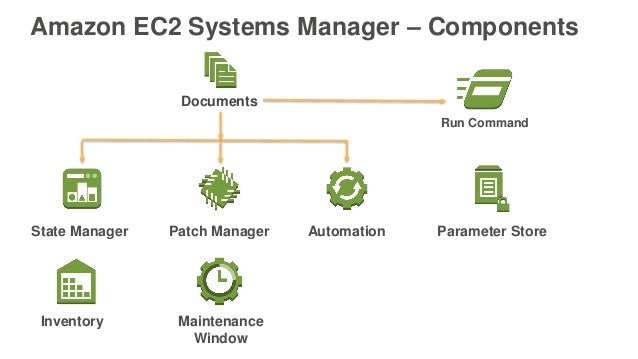
AWS Systems Manager contains the following tools:

• Resource groups: Lets you create a logical group of resources associated with a particular workload such as different layers of an application stack, or production versus development environments. For example, you can group different layers of an application, such as the frontend web layer and the backend data layer. Resource groups can be created, updated, or removed programmatically through the API.

If you are interested to learn AWS you can enroll for free Live demo in AWS Online Training

• Insights Dashboard: Displays operational data that the AWS Systems Manager automatically aggregates for each resource group. Systems Manager eliminates the need for you to navigate across multiple AWS consoles to view your operational data. With Systems Manager you can view API call logs from AWS CloudTrail, resource configuration changes from AWS Config, software inventory, and patch compliance status by resource group. You can also easily integrate your AWS CloudWatch Dashboards, AWS Trusted Advisor notifications, and AWS Personal Health Dashboard performance and availability alerts into your Systems Manager dashboard. Systems Manager centralizes all relevant operational data, so you can have a clear view of your infrastructure compliance and performance.

• Run Command: Provides a simple way of automating common administrative tasks like remotely executing shell scripts or PowerShell commands, installing software updates, or making changes to the configuration of OS, software, EC2 and instances and servers in your onpremises data center.

• State Manager: Helps you define and maintain consistent OS configurations such as firewall settings and anti-malware definitions to comply with your policies. You can monitor the configuration of a large set of instances, specify a configuration policy for the instances, and automatically apply updates or configuration changes.

• Inventory: Helps you collect and query configuration and inventory information about your instances and the software installed on them. You can gather details about your instances such as installed applications, DHCP settings, agent detail, and custom items. You can run queries to track and audit your system configurations.

• Maintenance Window: Lets you define a recurring window of time to run administrative and maintenance tasks across your instances. This ensures that installing patches and updates, or making other configuration changes does not disrupt business-critical operations. This helps improve your application availability.

• Patch Manager: Helps you select and deploy operating system and software patches automatically across large groups of instances. You can define a maintenance window so that patches are applied only during set times that fit your needs. These capabilities help ensure that your software is always up to date and meets your compliance policies.

• Automation: Simplifies common maintenance and deployment tasks, such as updating Amazon Machine Images (AMIs). Use the Automation feature to apply patches, update drivers and agents, or bake applications into your AMI using a streamlined, repeatable, and auditable process.

• Parameter Store: Provides an encrypted location to store important administrative information such as passwords and database strings. The Parameter Store integrates with AWS KMS to make it easy to encrypt the information you keep in the Parameter Store.

Learn AWS Interview questions

• Distributor: Helps you securely distribute and install software packages, such as software agents. Systems Manager Distributor allows you to centrally store and systematically distribute software packages while you maintain control over versioning. You can use Distributor to create and distribute software packages and then install them using Systems Manager Run Command and State Manager. Distributor can also use Identity and Access Management (IAM) policies to control who can create or update packages in your account. You can use the existing IAM policy support for Systems Manager Run Command and State Manager to define who can install packages on your hosts.

• Session Manager: Provides a browser-based interactive shell and CLI for managing Windows and Linux EC2 instances, without the need to open inbound ports, manage SSH keys, or use bastion hosts. Administrators can grant and revoke access to instances through a central location by using AWS Identity and Access Management (IAM) policies. This allows you to control which users can access each instance, including the option to provide non-root access to specified users. Once access is provided, you can audit which user accessed an
instance and log each command to Amazon S3 or Amazon Cloud Watch Logs using AWS CloudTrail.

Design a site like this with WordPress.com
Get started